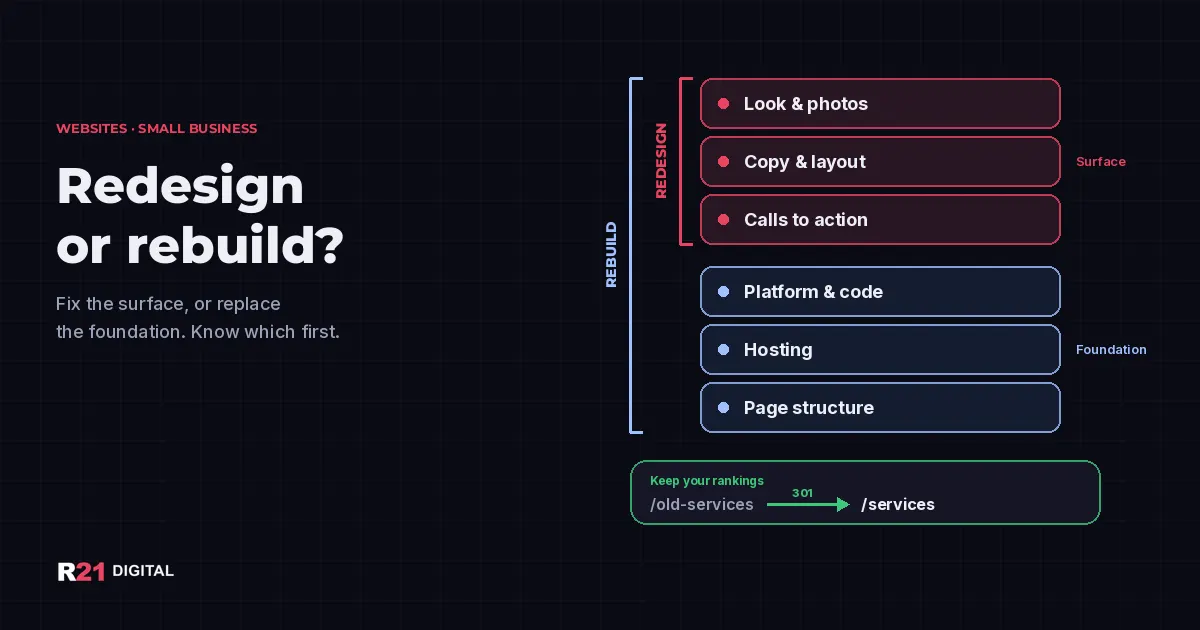
Short answer: Redesign your website when the foundation still works: the platform gets updates, the site loads well on a phone and you can edit it yourself, but it looks dated or doesn't turn visits into calls. Rebuild it when the foundation is the problem: an unsupported platform, a site that breaks on phones, or one nobody can change. Either way, protect your old page addresses.
Not sure which one your site needs? Book a call with R21 Digital or call +1 480-997-4639.
What is the difference between a redesign and a rebuild?
A redesign works on the surface. You keep the platform, the hosting and most of the page structure, and you change the look, the copy, the layout, the photos and the calls to action. It's like repainting and rearranging a store that is structurally sound.
A rebuild replaces the foundation. The platform or code changes, the hosting setup changes, and the page structure often changes too. The new site might even look similar to the old one. What changes is what it runs on and how easy it is to keep working.
Owners often ask for "a new website" when they only need a redesign, or ask for "a refresh" when the site really needs to be rebuilt. Getting this right first saves money and avoids surprises halfway through the project.
When is a redesign enough?
A redesign is usually enough when most of these are true:
- The platform is current. It receives updates, and installing them doesn't break the site.
- It works on a phone. Pages fit the screen, buttons are easy to tap and the contact form sends.
- You can edit it. You or your team can change a price, a photo or your hours without calling a developer.
- Speed is acceptable, or the problems come from things a redesign fixes, like oversized photos.
- The structure still matches your business. Your services and your page addresses still make sense.
In that case, the problem is usually the message: an unclear headline, a contact button buried at the bottom, old photos or services you no longer offer. Our guide to what a Puerto Rico business website needs in practice covers what to focus on.
When do you need a rebuild?
These six signs point to a rebuild:
- The platform is out of support. If your site runs on WordPress or another PHP system, ask your host which PHP version it uses. PHP's official supported versions page shows 8.1 and older no longer get security fixes, and 8.2 reaches end of security support at the end of 2026; check that page for the version your site runs. WordPress recommends PHP 8.3 or greater. If the site can't move to a newer version without breaking, a rebuild is the honest fix.
- It fails on phones. Google uses the mobile version of a site for indexing and ranking. A desktop-only design patched for mobile is hard to save.
- It stays slow after the easy fixes. Google's Core Web Vitals guidance suggests the main content should load within 2.5 seconds. If compressing photos and removing plugins doesn't get you close, the problem is often the theme or the code.
- Nobody can edit it. The person who built it is gone, the login is lost or every change needs custom code.
- You can't take your content with you. Some builders make it hard to export pages, blog posts or customer data.
- Your business changed shape. You added services, opened a second location or need a real Spanish and English version, not a translation plugin.
One sign alone doesn't always mean starting over. Two or more usually do.
How can you check your own site in 30 minutes?
You don't need to be technical to get a first read:
- Open the site on your phone and try to call, send the form and find your hours.
- Look at the Core Web Vitals report in Google Search Console, if you have it set up, to see which pages are slow.
- Email your host and ask for the PHP version and when the platform was last updated.
- Try to change one thing yourself, such as a phone number or a photo.
- List your top pages from Search Console or your analytics. Those are the addresses you can't lose.
- Write down what changed in your business since the site was built.
If several answers come back as "I don't know" or "it can't be done," that's useful information too. Our list of common website mistakes adds a monthly check you can run afterward.
How do you keep your Google rankings during a rebuild?
This is where many new websites lose traffic. Google's guide to site moves with URL changes lays out the basics:
- Map every old URL to a new one before launch, starting with the pages that get visits.
- Use permanent 301 redirects on the server. Google says 301 and other permanent redirects don't cause a loss in PageRank, and its redirects guide explains the options.
- Test the redirects and submit an updated sitemap.
- Watch Search Console for errors in the weeks after launch.
Google also warns to expect temporary ranking changes while it recrawls the site, and says it can take a few weeks or more for a medium-sized site. Plan a launch outside your busiest season.
What should you ask before you approve either one?
Whoever does the work, ask these questions before you sign:
- Will my page addresses change, and who sets up the redirects?
- Who owns the domain, the hosting account and the content after launch?
- Can I edit text, photos and hours myself?
- How will updates and security patches be handled after launch?
- How will you measure speed and mobile use before and after?
If you're comparing quotes, our article on what a website costs in Puerto Rico explains what changes the price. Choosing the platform? See our comparison of website platforms for Puerto Rico businesses.
Not sure whether your site needs a redesign or a rebuild?
R21 Digital reviews websites for small businesses in Puerto Rico and Arizona and tells you plainly whether a redesign will do or a rebuild is worth it, with a redirect plan to protect what already ranks. See our web development service, call +1 480-997-4639, book a call or find R21 Digital on Google.