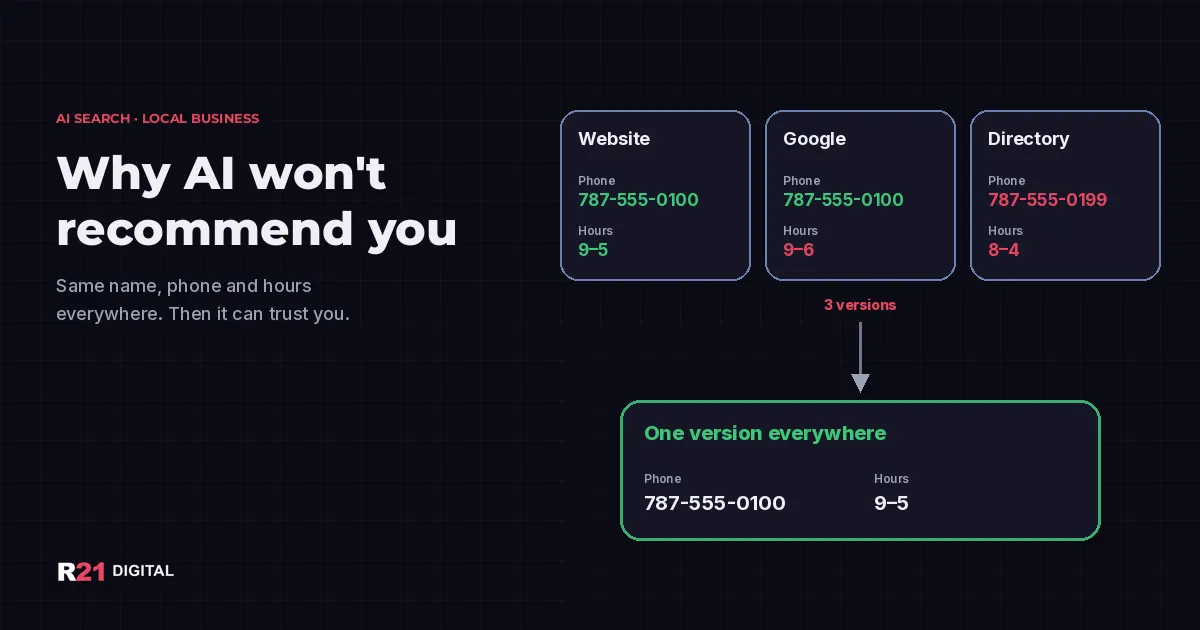
Short answer: AI assistants like ChatGPT, Gemini and Google's AI answers are more likely to recommend a local business when its name, address, phone, hours and website read the same everywhere: on its own site, on Google, on Bing, on Apple Maps and in directories. When those details disagree, the assistant has to guess, and a competitor with clean data becomes the safer answer. Fixing it is a one-afternoon job with the checklist below.
Want us to audit your listings? Book a call with R21 Digital or call +1 480-997-4639.
Why does inconsistent business information hurt you with AI?
Because AI answers are built from sources, and your listings are sources. OpenAI's help page on ChatGPT search explains that it searches the web, cites what it finds, and sometimes partners with other search providers to get results. Google's AI answers lean on the same local data that powers Search and Maps.
So picture what happens when your website says you close at 5, Google says 6, and an old directory still shows the phone you had in 2021. A person might call and figure it out. An assistant summarizing those pages has three versions of the truth and no way to call. That uncertainty is exactly what you want to remove.
What counts as "your data" online?
Five details do most of the work:
- Name: the real-world name on your sign, invoices and website.
- Address or service area: the street address customers visit, or the towns you serve if you go to them.
- Phone: one main number that you control and answer.
- Hours: regular hours plus holiday and special hours.
- Website: one main URL, the same in every listing.
Category and a short description matter too, but if these five match everywhere, you have already done the hard part.
What do Google's rules say about consistency?
Google is direct about it. Its guidelines for representing your business ask you to represent your business as it is consistently shown in the real world across signage, stationery and branding, and to keep only one profile per business. The name must not include taglines, phone numbers, store codes or service keywords. The phone must be under your direct control, and a local number is preferred over a central call center line.
Google also notes that local results depend on relevance, distance and popularity, and that complete, accurate information helps. Its help page on improving your local ranking lists accurate hours and complete details among the basics. Our guide to optimizing your Google Business Profile for AI and voice goes deeper on the profile itself.
Where should you check your listings this week?
Start with the places you control, then the places that copy you:
- Your website: footer, contact page and any location pages.
- Google Business Profile: name, address or service area, phone, hours, website.
- Bing Places for Business: many owners never claim it, and ChatGPT search sometimes partners with other search providers (OpenAI lists Microsoft among them).
- Apple Business Connect: this is what iPhone users see in Apple Maps and when they ask Siri.
- Facebook and Instagram: the About section and contact buttons.
- Directories you already appear in: chamber of commerce, industry associations, Yelp, local guides and classifieds.
Search your business name plus your town and also your old phone number. Any result showing outdated data goes on your fix list. If you want to see what AI assistants already say about you, our 30-minute self-check walks you through it.
How do you fix mismatched data without making it worse?
Pick one official version of every detail first. Write it in a note: exact name, address format (suite included or not), phone format and hours. Then copy and paste it everywhere instead of retyping it.
A few rules keep the cleanup clean:
- Edit, don't duplicate. If you find a second Google profile for the same business, do not create a third. Claim and fix the existing ones, and ask Google to remove true duplicates.
- Keep the same phone everywhere. Tracking numbers are fine on ads, but your listings should show your main line.
- Update holiday hours early. In Puerto Rico, the Christmas season runs long, and hours change often. Set special hours before customers find out the hard way.
- Close the loop on moves. If you changed address, update the old listings instead of leaving them to compete with the new one.
How does your website help AI read the right version?
Your website is the one source you fully control, so make it easy to read. Put your name, address or service area, phone and hours as plain text on a contact page, not only inside an image. Google's documentation on LocalBusiness structured data shows how to label those same details in code so machines can read them without guessing. The values in that markup should match your Google profile exactly. If schema sounds technical, our schema markup guide for owners explains it in plain language.
OpenAI also notes that a site has to allow its search crawler, OAI-SearchBot, to be eligible for ChatGPT search results. If your web host or firewall blocks unknown bots, ask whoever manages your site to check.
How do you know it worked?
Give it a few weeks for search engines and assistants to see the changes. Then ask ChatGPT, Gemini and Google the same questions a customer would: "What time does [your business] close?" or "Who does [your service] in [your town]?" Write down whether the answers show your correct phone and hours. Our routine for measuring AI citations turns that into a monthly habit. And if your business still does not show up beyond your own listings, read where AI looks beyond your website.
Want help getting your business cited correctly?
R21 Digital audits and fixes business listings for small businesses in Puerto Rico and Arizona, then sets up the website signals that help AI assistants read the right version. See our GEO and AI search service, call +1 480-997-4639, book a call or find R21 Digital on Google.